For students studying journalism, media, film and related disciplines, understanding production theory is only part of their learning journey. Developing practical skills also means becoming familiar with the technology behind production and how different elements come together within a live production workflow.
QuickLink StudioPro™ Lab helps educational institutions bring that experience into the classroom, giving students more opportunities to explore professional video production software and develop their understanding of production workflows.
In this article:
What is StudioPro™ Lab?
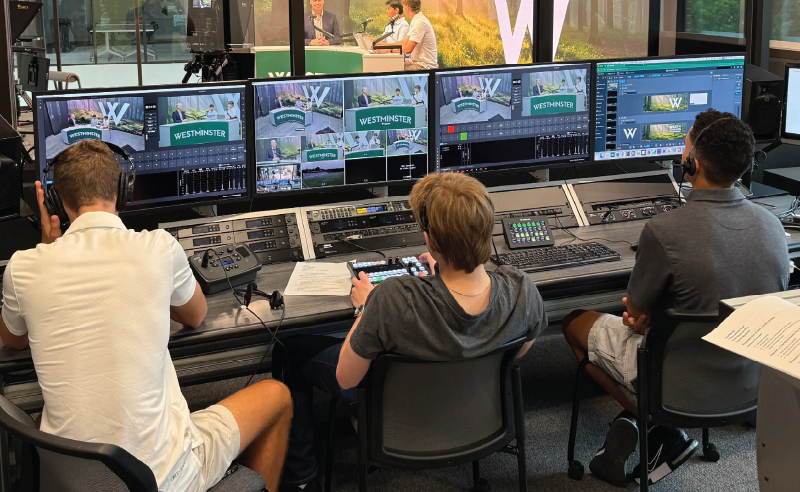
StudioPro Lab is an educational extension of QuickLink StudioPro, designed to give students hands-on experience exploring StudioPro software on their own PCs.
At the centre of the solution is QuickLink StudioPro, an intuitive live production platform designed to make multi-camera production accessible without the complexity traditionally associated with broadcast systems. Typically, StudioPro runs on dedicated hardware, providing a complete production environment from a single system.
StudioPro Lab extends access to StudioPro™ software on student PCs, allowing educators to introduce practical learning activities across the classroom while retaining the institution’s dedicated StudioPro system for production.
Rather than relying solely on demonstrations or taking turns using a shared production setup, students can explore the software, experiment with different configurations and develop their understanding of production workflows through direct experience.
What can students learn with StudioPro™ Lab?
For educators, hands-on learning can make the difference between understanding a production concept and knowing how to actually apply it.
With StudioPro™ Lab, educators can introduce follow-along and collaborative exercises that allow students to develop their understanding of live video production and the processes behind it.
Students can learn how to:
- Navigate the StudioPro interface and production environment
- Understand how scenes are built and customized
- Explore production layouts and visual composition
- Learn how production elements are arranged and configured
- Develop an understanding of live production workflows
- Experiment with different approaches to production design
This approach encourages students to learn through exploration. They can familiarize themselves with the software, make changes to their work and investigate different configurations as they develop their technical understanding and creative confidence.
More opportunities for practical learning
Providing students with access to production technology can be challenging in educational environments, particularly when many students need opportunities to learn the same systems.
StudioPro™ Lab helps educators introduce hands-on video production into a wider range of classroom activities. Students can explore StudioPro software on their assigned PCs, while the institution’s dedicated StudioPro system remains available for its intended production use.
This allows educators to incorporate software-based learning activities into their teaching, giving students more opportunities to familiarise themselves with production tools and concepts rather than relying exclusively on demonstrations or occasional access to dedicated production equipment.
From the classroom to professional production
Graduates entering broadcast, media, corporate video and other areas of the Media & Entertainment industry may encounter a variety of production systems and workflows throughout their careers.
While no educational programme can replicate every professional environment, familiarity with live production technology and workflows can give students a valuable foundation.
StudioPro Lab gives students the opportunity to build that familiarity with professional production concepts before entering the workplace. By exploring production environments, understanding how scenes are configured and developing an awareness of the processes involved in live production, students can build knowledge that supports their continued learning and future development.
Give the next generation of producers more opportunities to create
QuickLink StudioPro Lab helps educational institutions introduce students to professional video production technology as part of their learning experience.
By extending StudioPro software to student PCs, StudioPro Lab gives more students the opportunity to explore production environments, experiment with available configurations and develop their understanding of live production workflows in the classroom.
Interested in bringing StudioPro into your classroom? Get in touch with the QuickLink team to discuss your institution’s requirements and explore how QuickLink StudioPro™ can support your educational environment.
Want to learn more about StudioPro?
Explore QuickLink StudioPro™, or get in touch with the team to talk through your setup.