The podcast world has changed, and the biggest change isn’t where people listen. It’s that more and more of them are watching.
Video podcasting, or vodcasting, has moved from an experiment to mainstream expectation remarkably quickly. For anyone producing podcast content in 2026, that expectation shift matters. The question is no longer whether to add video, but how to do it in a way that is easily achievable and looks professional.
The numbers are hard to ignore
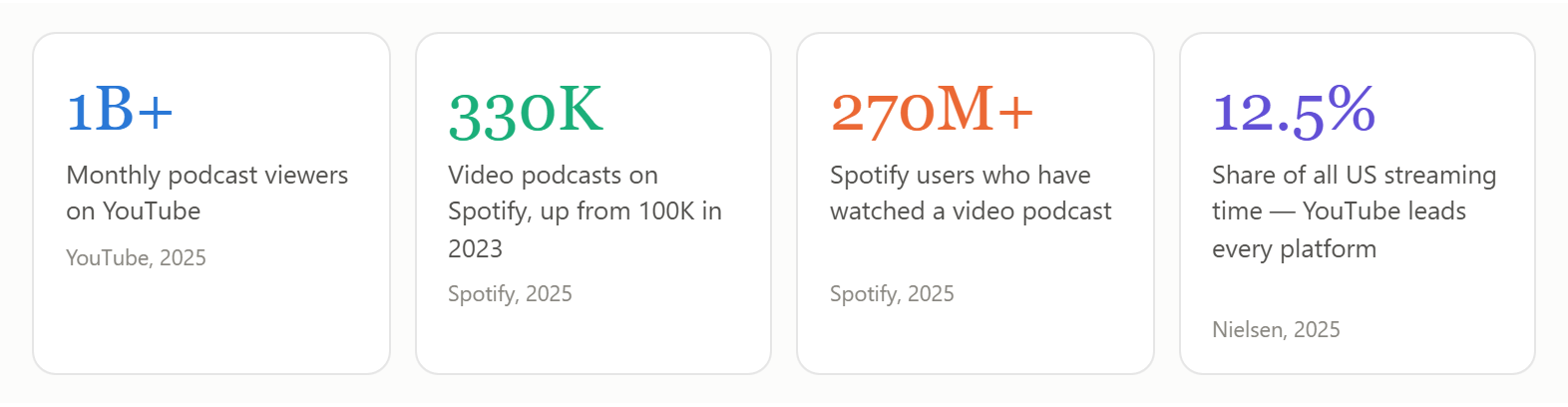
YouTube alone pulls in over a billion monthly podcast viewers and accounts for 12.5% of all US streaming time. That’s more people watching podcasts on YouTube than people watching Netflix. At that scale, podcasting isn’t a niche format anymore, it’s actually one of the biggest forms of media on the planet.
Spotify has grown its video podcast library from 100,000 titles to over 330,000 in two years, with more than 270 million users having watched at least one. Apple Podcasts added native video support in early 2026. And Netflix and Spotify announced a partnership to bring video podcasts to Netflix. If you needed a signal that the format has well and truly arrived, that’s probably it.
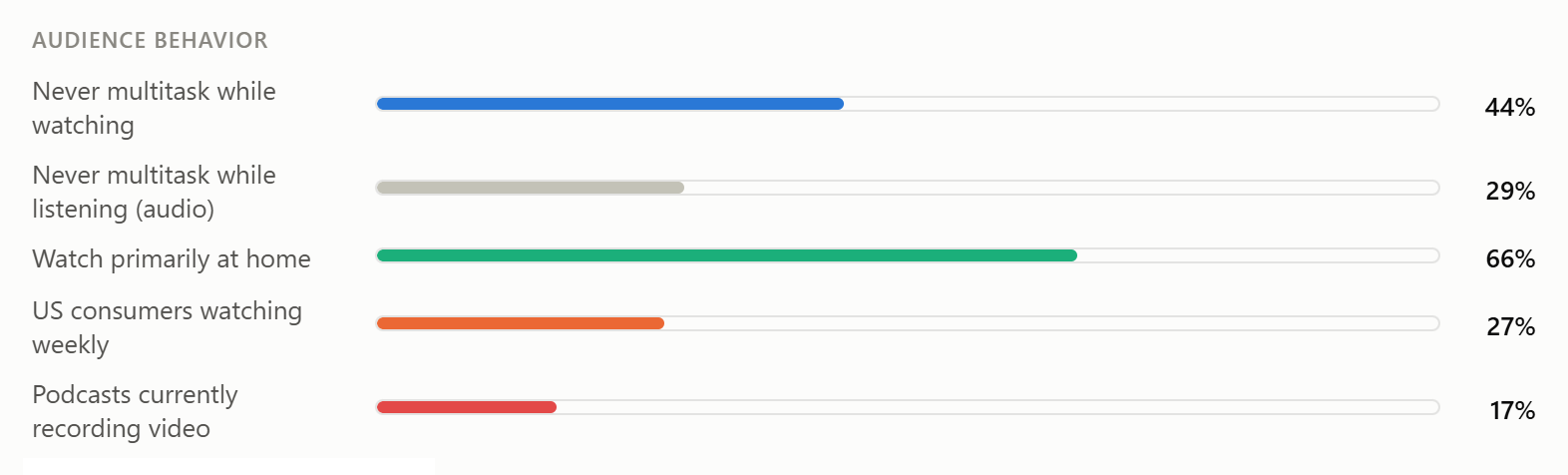
Weekly viewership tells the same story. By the end of 2025, 27% of US consumers were watching a video podcast every week. More than half of all Americans have watched one at least once. These aren’t niche format numbers. They’re mainstream media numbers.
Why video is worth it
The obvious answer is reach. More platforms, more discoverability, more audience. But the case for video goes deeper than that.
People pay more attention. Research from Deloitte found that 44% of video podcast viewers never multitask while watching, compared to 29% of audio-only listeners. Video holds attention in a way audio simply can’t. And video podcast watchers consume 1.5 times more content overall than their audio counterparts. If you’re trying to build an audience, that’s a meaningful difference.
The way people are consuming this content has shifted too. Two-thirds of weekly podcast consumers are watching at home, often on a TV screen. Podcasting was never just for the commute, but it’s clear now that a huge part of the audience is settled in front of a big screen. A pixelated guest feed or a badly framed host shot hits very differently there than it might on a phone. The bar for “good enough” has moved.
There’s also a brand argument. An audio episode lives in a feed and gets listened to once. A well-produced video episode is clippable, shareable, searchable on YouTube, and a visible expression of your brand every time someone watches it. For organizations using podcasting as part of a wider communications strategy, video transforms every episode into something that keeps working long after it’s published.
Despite all of this, only 17% of podcasts were recording video as of mid-2025. The audience is there. The platforms are there. The competition isn’t quite yet.
Where most shows hit a wall
The opportunity and requirement has never been more clear. Now, the challenge is in the execution, which is where it gets complicated.
Professional vodcasting isn’t just about having a camera in the room. You need to switch cleanly between multiple camera angles. Remote guests need to look like they’re part of a proper production, not an after thought video call that’s been patched into production. You need professional, branded graphics, lower thirds, title cards, transitions, logos, applied consistently, every episode. You need to stream live to multiple platforms while simultaneously recording clean isolated feeds for post. And ideally, you need one person to manage all of this.
Historically, getting there meant cobbling together a complex stack of hardware and software, or just accepting that your production would fall short of audience expectations.
QuickLink StudioPro™ was built as a direct answer to that problem.
The intuitive StudioPro Fusion control surface, combined with the powerful capabilities of StudioPro, makes this video switching solution one of the most compelling and flexible available in the industry. I was able to create my template on my laptop well in advance of the production and simply load it onto the workstation once it arrived in the control room the day before the live event.
— Hugo Chevrette, Technical Application Specialist at SFM (part of Midwich Group)
What StudioPro actually does for a vodcast production
StudioPro is QuickLink’s all-in-one 4K video production platform. Switching, graphics, audio, streaming, and recording, all in a single system. Organizations worldwide are using StudioPro across broadcast, corporate, education, house of worship and live events. For vodcasting specifically, here’s where it makes the difference.
1. Scenes over complexity
StudioPro uses a scene-based production system rather than the traditional M/E switcher logic that most broadcast hardware is built around. For vodcast workflows, it’s a much more intuitive approach.
Build your layouts in advance: solo host, two-person interview, multi-guest panel, B-roll, sponsor card. Switch between them with a single button push or mouse click. Up to 120 fully customizable scenes are available. Your whole episode structure is mapped out before you hit stream or record, so the technical side of things never interrupts the conversation.
2. Remote guests that actually look good
Remote guests are a vodcasting staple, and they’re also where production quality most visibly falls apart. StudioEdge is built into every StudioPro and solves this properly.
Rather than screen capturing a low-quality conferencing call, StudioEdge pulls guests from Zoom, Microsoft Teams, Cisco Webex, WhatsApp, QuickLink StudioCall, and other platforms as clean, independent sources. StudioEdge doesn’t compromise on quality, so your remote guest holds up on screen alongside your studio cameras.
3. Live and captured at the same time
StudioPro streams to YouTube, Facebook Live, Twitch, and other platforms simultaneously via RTMP and SRT. At the same time, up to ten individual sources record as ISO feeds: clean, isolated, ready for post.
Go live and capture your production seamlessly.
4. Control however you like
The StudioPro IP Panel runs on any desktop, tablet, or mobile, giving producers full remote control over switching, graphics, and media playback from wherever they are. It integrates natively with Elgato Stream Deck hardware for tactile button control, a familiar tool for a lot of content creators. And for productions that want a dedicated hardware surface, the StudioPro Proton and StudioPro Fusion control panels are built to control the whole studio.
StudioPro in the real world
It’s one thing to talk about what StudioPro can do. It’s another to see it running a real vodcast production.
1. From trade show booth to broadcast studio
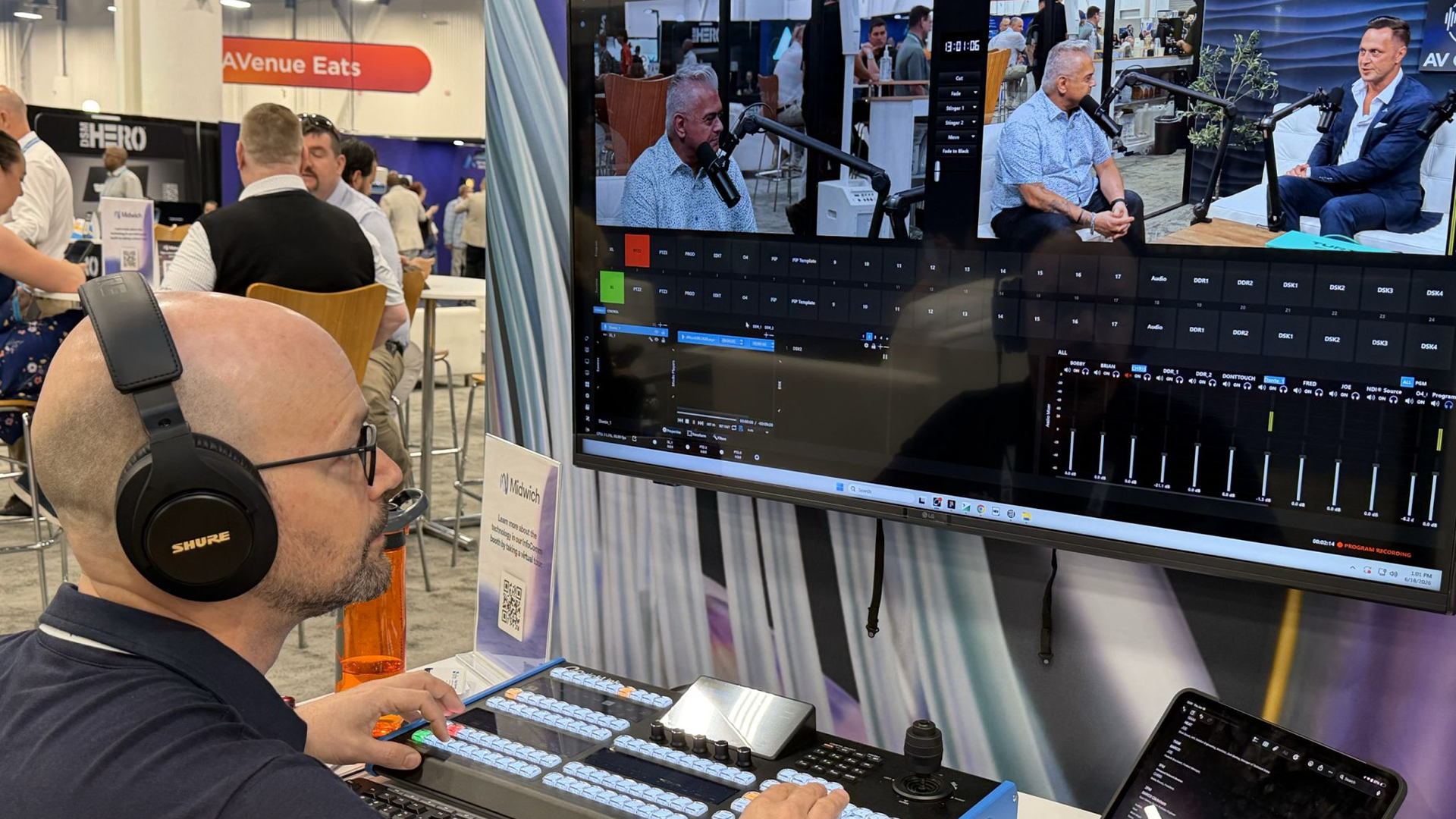
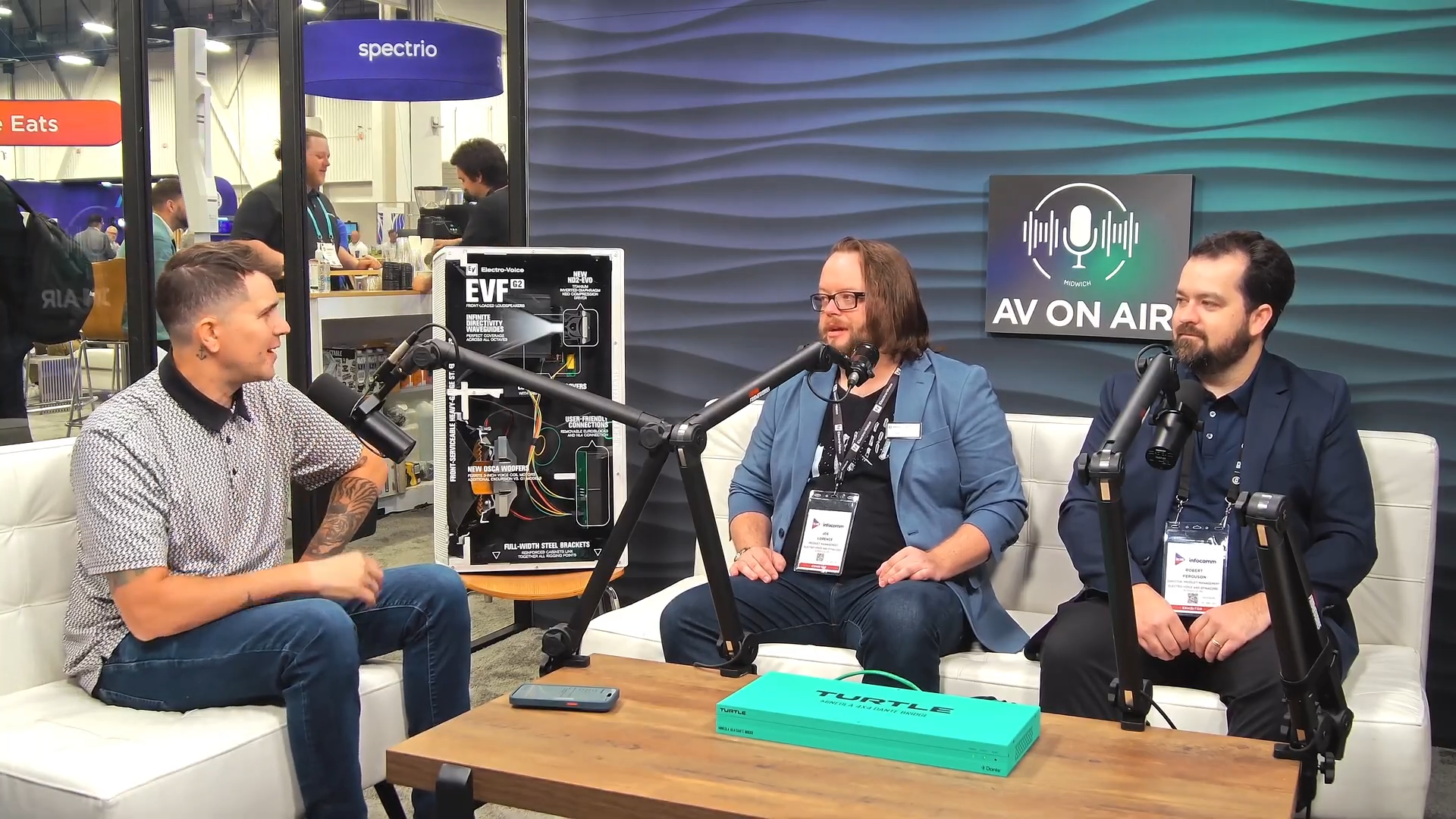
At InfoComm 2026, Midwich US produced 10 live episodes of their AVonAir podcast from a single trade show booth, using StudioPro to handle switching, recording, and graphics throughout. Episodes were on YouTube within two hours of wrapping. One operator, one platform.
"The intuitive StudioPro Fusion control surface, combined with the powerful capabilities of StudioPro, makes this video switching solution one of the most compelling and flexible available in the industry."
— Hugo Chevrette, Technical Application Specialist, SFM (part of Midwich Group)
2. The Green Bay Packers: StudioPro at NFL scale
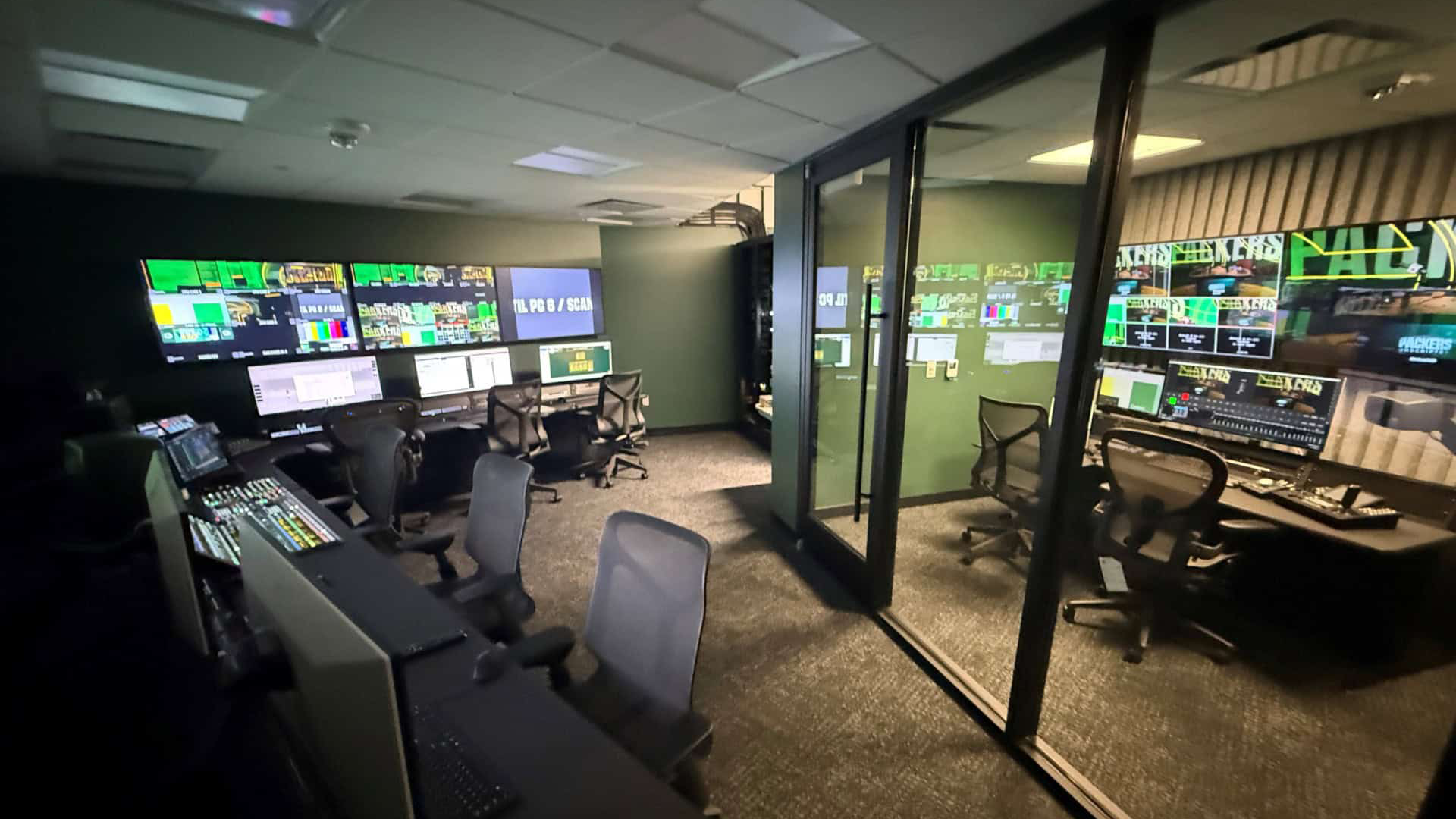
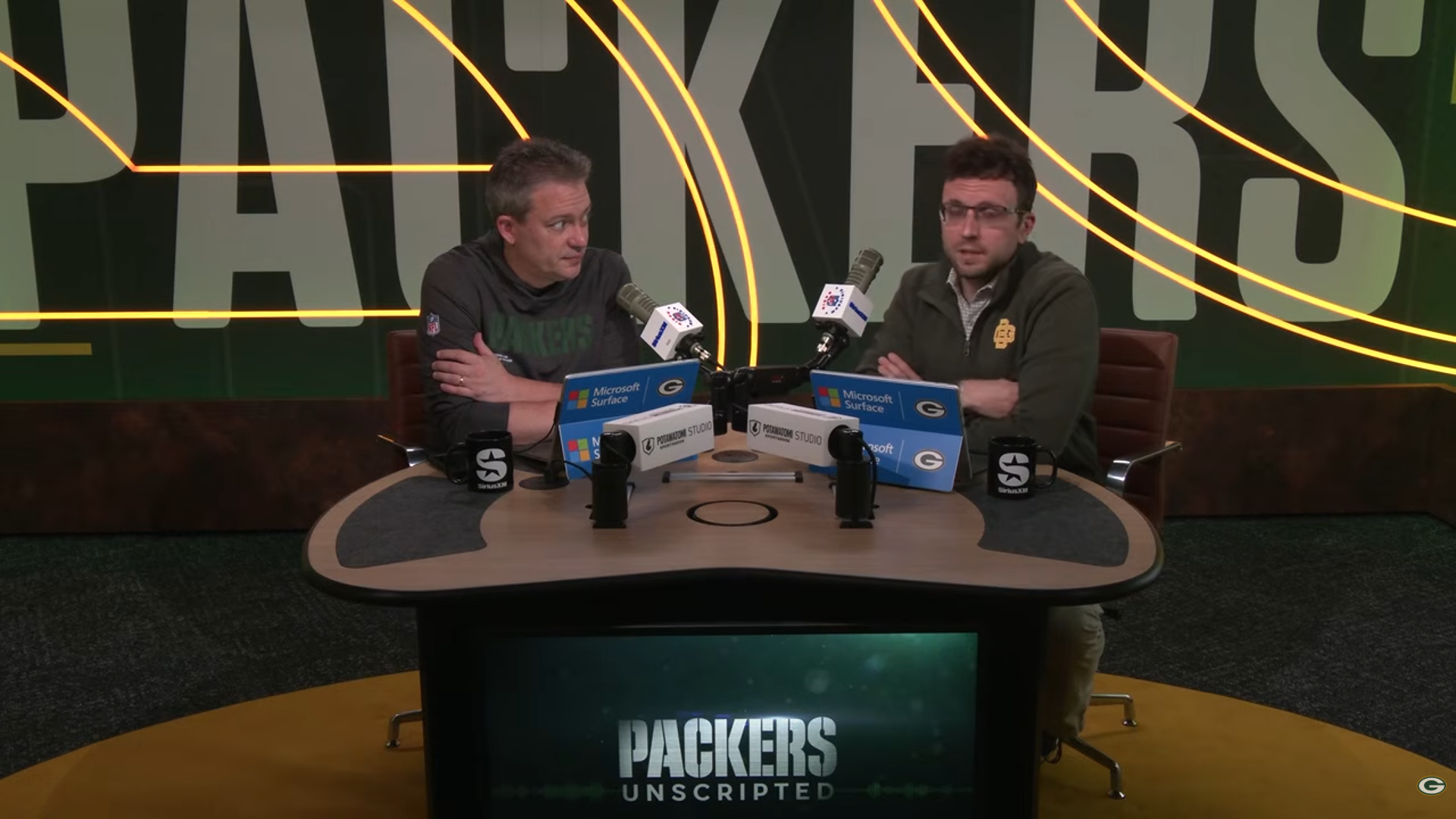
When the Green Bay Packers opened their new content studio at Lambeau Field, StudioPro was specified as the live production and streaming solution for the facility, including the dedicated podcast space that now produces their Packers Unscripted video podcast series. As Kregg Shilbauer, Director of Broadcast and Video Production at the Packers, puts it: “We’ve become a video-production house for the entire organization.“
Consistency is what builds a show
Production quality matters. But so does consistency, and it’s often the harder thing to deliver.
Every episode of a well-produced vodcast should feel like it came from the same place. Same graphic style. Same lower third design. Same visual language that tells your audience within a few seconds that this is your show. Getting that right reliably, regardless of who’s operating, is where a lot of productions fall short.
StudioPro makes it repeatable. Set up your branded scenes and graphic templates once. Every episode that follows inherits that standard. Your fiftieth episode looks as sharp and consistent as your first.
The window won’t stay open forever
The podcasting market is forecast to grow from $22.6 billion in 2024 to over $167 billion by 2033. Advertising revenues are set to hit $5 billion in 2026 alone. Video is pulling the biggest share of that growth.
But the competitive advantage of being an early mover in video podcasting won’t last indefinitely. Platform algorithms increasingly favor video. Audience expectations are moving in one direction. The producers who invest in production quality now, while the field is still relatively clear, are the ones who’ll have the audience, the authority, and the momentum when the rest of the market catches up.
StudioPro makes that investment accessible. Broadcast-grade switching, professional graphics, proper remote guest integration, multi-platform streaming, ISO recording, all in one system, without the technical difficulty and engineering overhead.
Video podcasting is here. The question is just what your production looks like.
Want to see what StudioPro can do for your vodcast production?
Explore QuickLink StudioPro™, or get in touch with the team to talk through your setup.